Typing values: units, arithmetic, dates and KW
Every number field in arcraum, in the Properties panel, the tool options and the settings, reads what you type the way you would write it on a sketch: with a unit, as a sum, with a decimal comma. Date fields take a calendar week as readily as a date.
Numbers with a unit or a sum
The grey unit at the end of a field says what it counts in, mostly mm. You can type more than a plain number:
- a unit: 25 cm in an mm field is 250 mm, 2,75 m is 2750 mm,
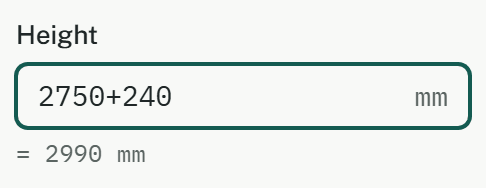
- arithmetic: 2750+240, (500-20)/2, 3*1250,
- a decimal comma or a decimal point: 36,5 cm and 36.5 cm are the same.
While the text isn't a plain number, the field shows under it what it comes to, such as = 2990 mm. Nothing is written until you take it.
Taking a value: Enter, Esc and the preview
In the Properties panel a change shows on the plan, in 3D and in the areas while you type, without being stored yet:
- Enter, or leaving the field, takes it: one step of undo, with an entry in the history.
- Esc gives back the stored value and ends the preview.
- With several elements selected that differ, the field is empty and reads "mixed"; what you type there goes to all of them.
On a settings page the fields wait for the save bar at the bottom instead, which saves everything at once.
Dragging a number
Press on a number field with the mouse and drag: to the right raises the value, to the left lowers it, one step per pixel, mostly 1 mm. The plan follows as you drag. Letting go takes the value as one step of undo; Esc while you still hold the button takes the drag back.

- A click without moving puts the cursor in the field to type, as usual.
- In a field that already has the cursor, a drag selects text instead.
- A field reading "mixed" doesn't drag: there is no number to count from.
- On a touch screen a finger scrolls, so there you type.
Dates and calendar weeks
A date field shows a date as 22/03/2027 in English and 22.03.2027 in German, but takes many forms:
- the full date, or short: 8/11/26, 8.11.26, 8.11. or 8.11, without a year meaning this year,
- ISO: 2026-11-08, and ISO weeks: 2027-W12,
- a calendar week: KW 12, KW 12/27, KW 12/2027, and in English also week 12, Wk 12, W12 or CW 12. A week means its Monday.
A two-digit year is the one nearest today: in 2026, 27 is 2027 and 77 is 1977. A day that doesn't exist, such as 31.02., is refused by name.
Under a filled field arcraum shows the weekday and the week, for example "Monday · week 12", so a date taken over from a phone call can be checked at once.
The calendar
The button at the end of the field, or Alt+↓ in it, opens a month view: Monday first, the calendar week beside each row, today marked.
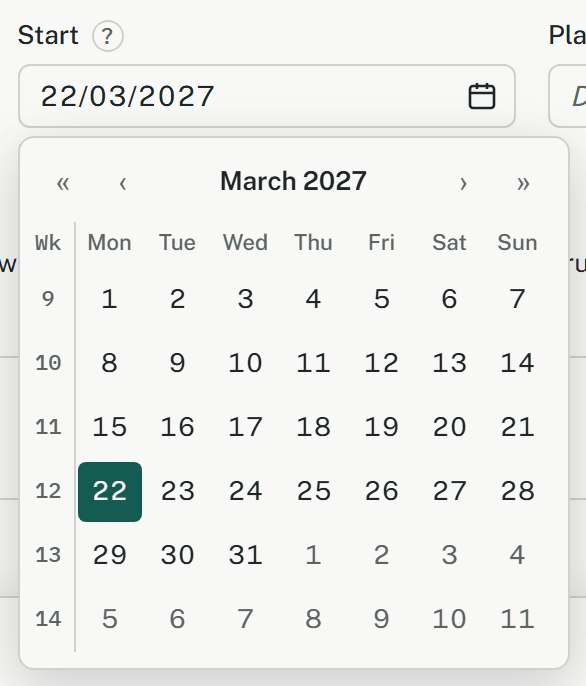
- ‹ and › go a month back or on, « and » a year.
- The arrow keys move by a day and a week, PageUp and PageDown by a month, with Shift by a year; Home and End go to the ends of the week.
- Enter or Space picks the day, Esc goes back to the field, and a click elsewhere closes it.