What needs you, and Today
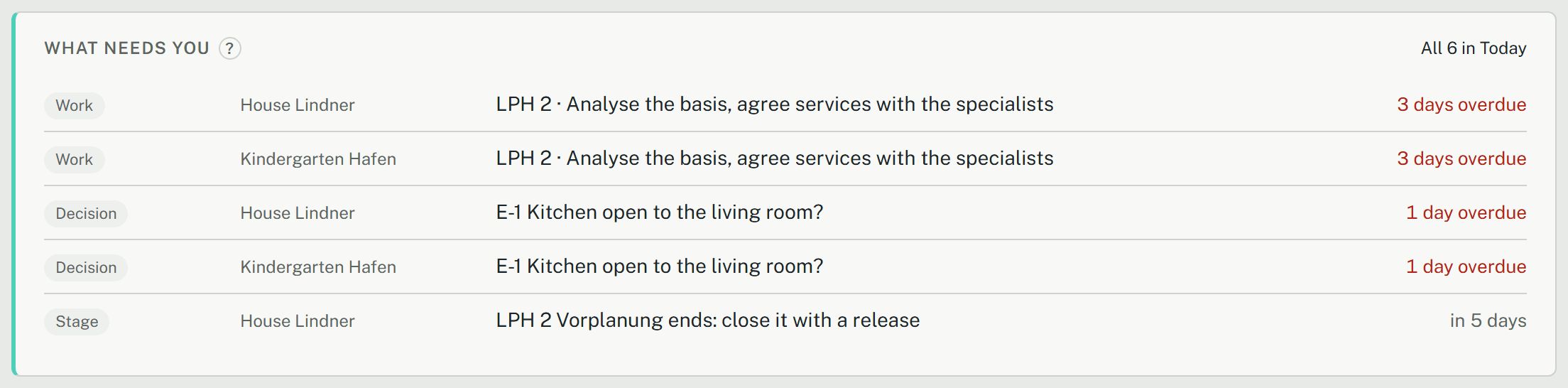
A project's overview starts with What needs you: what is overdue or due within two weeks, from every part of the project, in one list. Today gathers the same across all your projects of the office, on the project list and on a page of its own. Each line leads to where it is done.
On the project's overview
The card ranks what it finds: the longest overdue first, then what is due soon, then what waits on someone without a date. It lists:
- open decisions by their due date, and a client's answer given by link, to take over;
- work items with a due date (the project lead sees all; everyone else their own);
- the current stage's planned end, until a release closes it;
- defects past their deadline, as one line;
- warranties ending within 90 days;
- merge requests waiting, for a lead who may approve them.

- Click a line: it opens the area where it is done, at its card.
- Do it there as usual: record the decision, tick the item, close the stage.
- The line goes once it is done, or once its date is more than two weeks ahead.
The areas of a project
Under the project's name, one line says where it stands: the current stage, what ends it, how soon, and how many of its Grundleistungen are open. Click it for the band of stages and the schedule.

Below it, the overview has the same areas in every project, whatever the stage:
- Overview: What needs you, the current stage, the models, the key figures, the stage's work list and the schedule;
- Basis: the requirements and the Bebauungsplan, the site dossier and the room program;
- Costs: the Kostenschätzung;
- Decisions: decisions, merge requests and minutes of talks;
- Releases: the releases, what changed since the last one, and the permitted state;
- Site: defects, the site diary, acceptance and warranty;
- Documents: the project's documents and its library.
Each area has an address of its own, so a link to it or the browser's back button leads there.
The chip at the end of the areas, All LPH at first, picks one stage: whatever belongs to another stage fades, on every area, and nothing is hidden. In LPH 2 the site diary fades, for example; in LPH 8 the room program.
Today, across your projects
The project list leads with the five most urgent lines of all your projects, each naming its project. All n in Today opens the full list. A line opens the project's overview at the card where it is done.
- In each project you see what your role there gives you: as its lead everything, otherwise your own work items and what the project owes.
- Archived projects and the practice house are left out.